

Shopdrop's abandoned cart recovery saves every abandoned checkout, alerts you an hour later, and brings the shopper back by WhatsApp or reminder email.

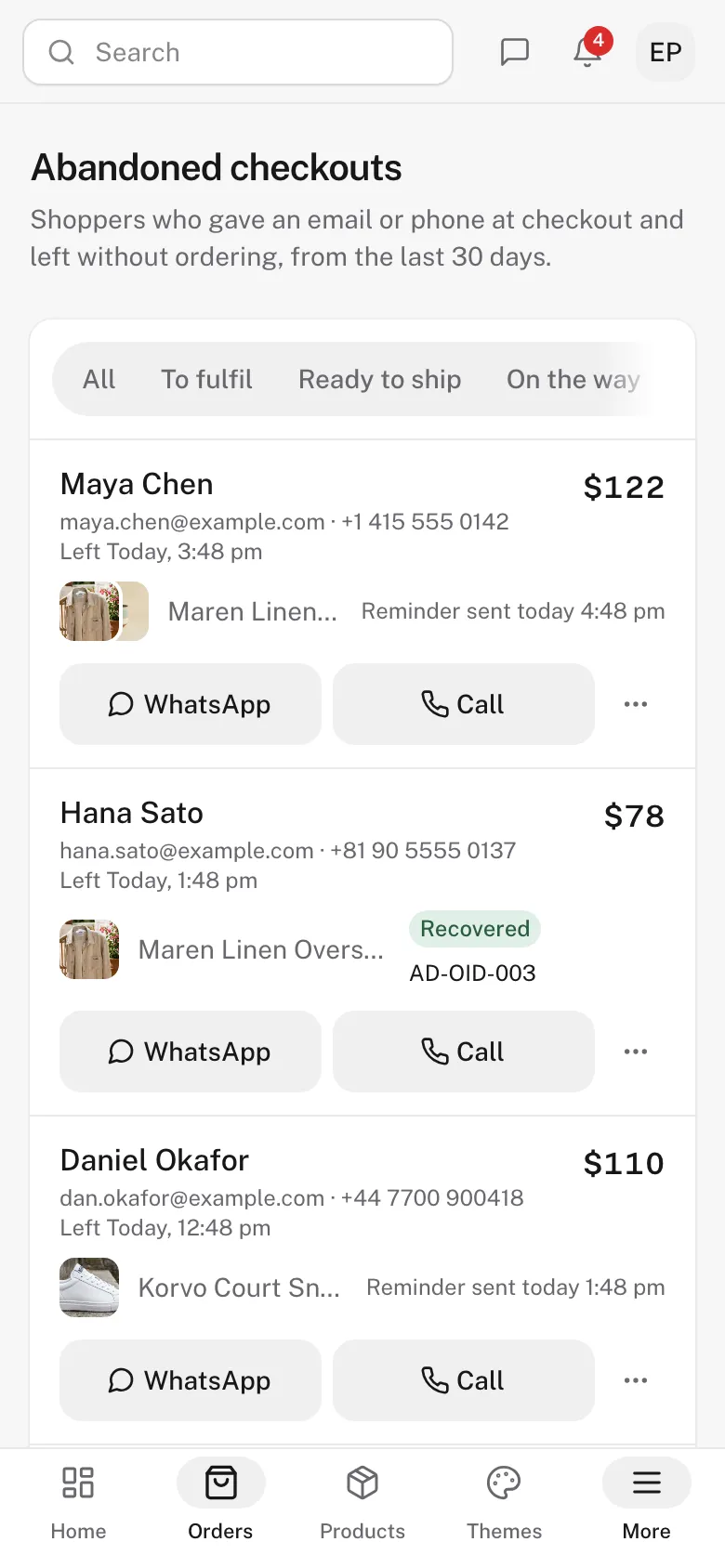
One shopper, from the moment they leave to the order in your list.
The shopper leaves
They type an email or phone number at checkout and leave before paying, so the checkout goes on your list with the cart and its value.
Every planYou hear about it
A bell alert, and a dot on Orders until you look.
Every planTap WhatsApp on their row. Your phone opens with the message and a link that restores the cart.
Starter and upYour store emails the cart, with one button back to checkout.
Starter and upA second email
Only for shoppers who still haven’t ordered, and it can carry one of your discount codes.
Growth and ProThe last word
The last one is optional. It repeats the cart and adds a few more of your products.
Growth and ProThe order comes back
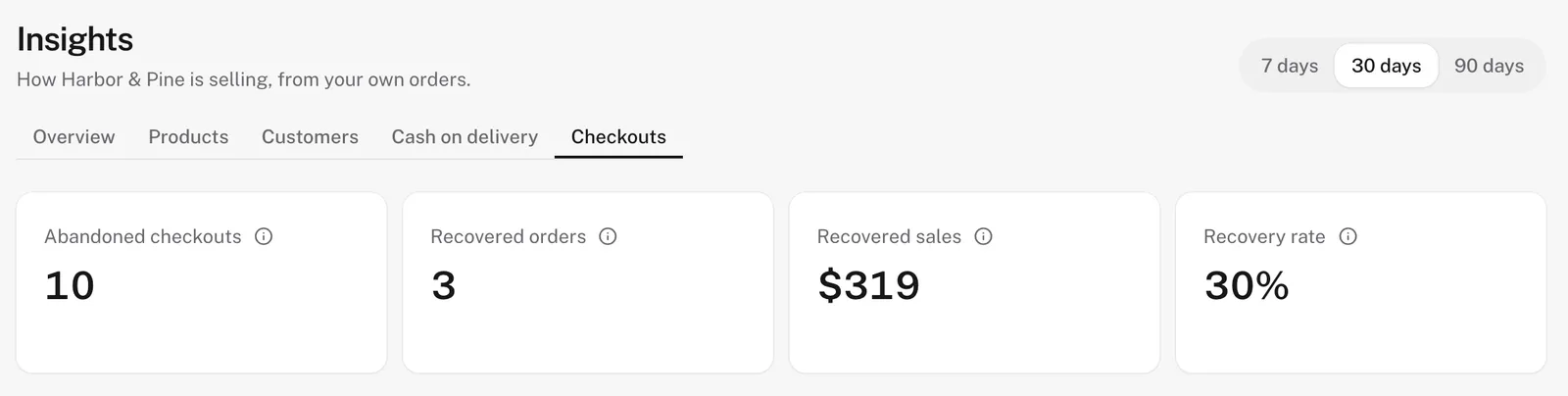
The list marks the checkout recovered, with its order number, and Insights counts recovered orders, recovered sales and your recovery rate.
Every plan
Your list of abandoned checkouts starts on the Free plan, from your store's first day.
Every good guide to cart recovery lands on the same few rules. Your Shopdrop store follows each one from the day you switch it on.
- 01
Send the first reminder within hours
The guides agree on one to four hours. Sooner reads as pushy.
The first email goes an hour after the shopper leaves, on every paid plan.
- 02
Follow up twice, then stop
A second email reaches the shoppers who meant to come back. The guides stop at three.
On Growth and Pro, a second email a day later and an optional third at three days. Then nothing more.
- 03
Show the cart, with one way back
Photos and names remind the shopper what they wanted. The way back should take one tap.
Every email shows the cart with its photos. The button fills in the cart and the shopper’s details.
- 04
Keep the discount for later
A code in the first email teaches shoppers to leave and wait for one.
On Growth and Pro, pick one of your own codes for the second and third emails only.
- 05
Answer the doubts that stop a checkout
Delivery cost, delivery time and how to pay are the usual reasons a shopper waits. Low stock helps only when it’s real.
Your own delivery and payment facts show in the email, with ratings once published and low stock when it’s true.
- 06
Reach shoppers who gave only a phone
An email reminder never reaches a shopper who typed only a phone number.
WhatsApp and Call buttons on every shopper, with the message written for you. From Starter.
An hour after a shopper leaves, your store sends them their cart with a button back to checkout. Starter sends that one email in Shopdrop’s words. Growth and Pro send up to three, with the words and look you choose.
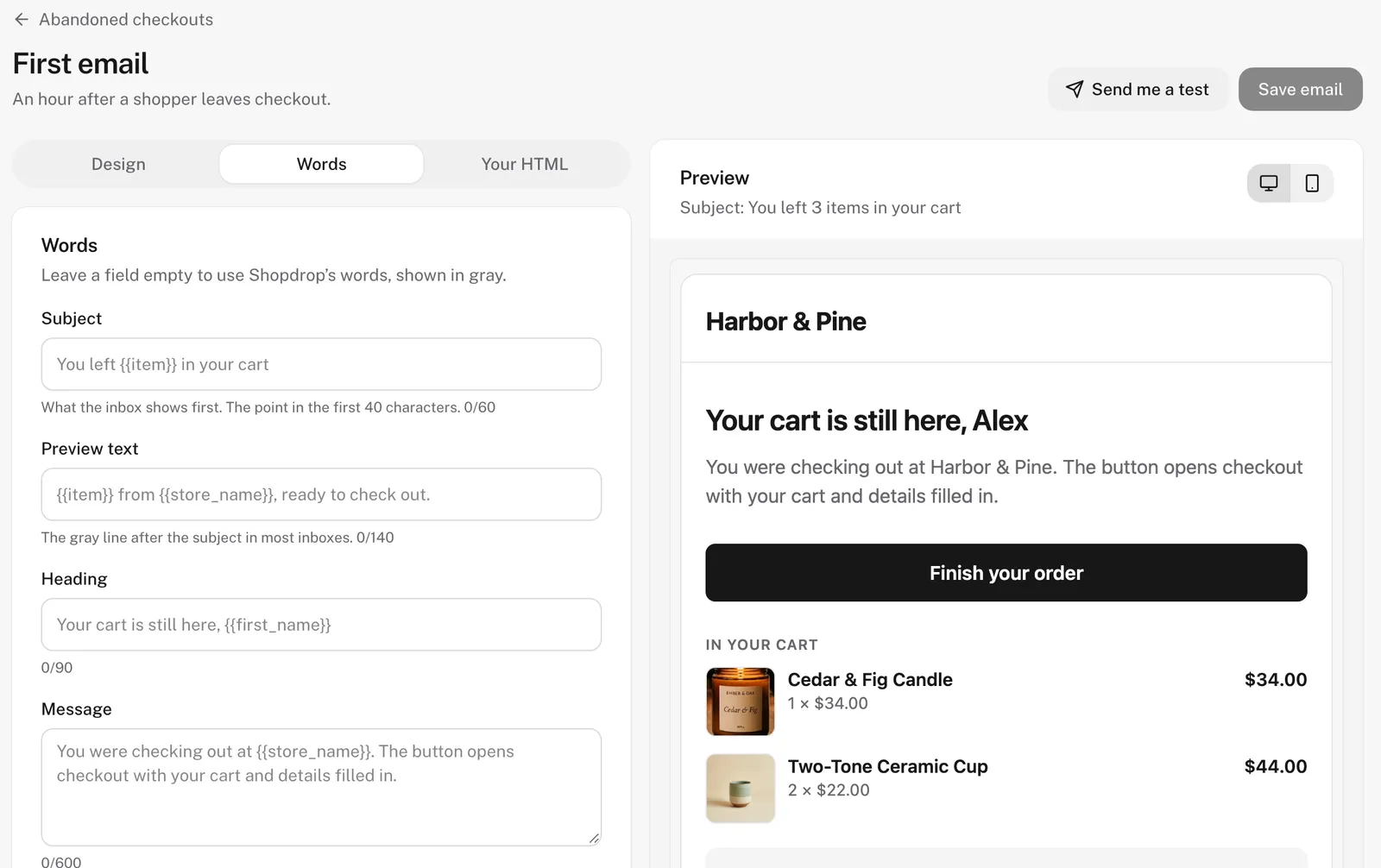
- Write your own words
- Change the subject, preview text, heading, message and button, and add the shopper’s first name or the item they left. The preview updates as you type, and you can send yourself a test.
- Choose the look
- Pick a layout, colors, a heading font and a button shape. Or paste your own HTML: tags drop in the cart and the link, and Shopdrop adds the unsubscribe line.
- Or ask Genie
- Tell Genie what you want, and it writes the email for 1 credit or designs it for 5.
Starter sends the first reminder email for $10 a month.
Every store sees its abandoned checkouts, and paid plans add who the shopper is and ways to follow up.
Free
$0
- Every abandoned checkout, with its cart, value and status
- An alert for each one
- Recovered orders, recovered sales and your recovery rate in Insights, over 7, 30 or 90 days
Starter
$10 a month
- Everything in Free
- Each shopper’s name, email and phone
- WhatsApp and Call buttons on every shopper, with a short message written for you and a link that restores their cart
- An automatic reminder email an hour after the shopper leaves
Growth and Pro
From $25 a month
- Everything in Starter
- The full series: a second email a day later and an optional third at three days
- Your discount code in the later ones
- Your words, your design or your own HTML, written or designed by Genie when you ask
Starter, Growth and Pro each start with a 7-day free trial.
How the cost compares
| Platform | See abandoned checkouts | Automatic reminder emails | Fee added to your sales |
|---|---|---|---|
| Shopdrop | Free plan | Starter, $10 a month, the first email. Growth, $25, all three | None |
| Shopify | Basic, $25 a month | Basic, $25 a month | Up to 2% with other payment providers |
| Squarespace | Basic, $19 a month | Basic, $19 a month | 2% on Basic |
| Wix | Core, $29 a month billed yearly | Core, $29 a month billed yearly | None listed |
Prices in US dollars from each company’s pricing page on 31 October 2026, billed monthly unless noted. They change, and can differ by country. See Shopdrop plans
Start on Free and see every abandoned checkout today.
What is an abandoned checkout?
A checkout a shopper started and left without placing the order. Shopdrop saves one as soon as the shopper types an email or phone number, so you can see who it was, what was in the cart and what it was worth.
Is abandoned cart recovery free on Shopdrop?
The list, the alerts and the Insights numbers are on every plan, including Free. Starter, at $10 a month, adds each shopper's name, email and phone, WhatsApp and Call buttons, and an automatic reminder email an hour after they leave. Growth, at $25 a month, and Pro send the full series of three, in your own words and design.
When do the reminder emails go out?
The first goes an hour after the shopper's last change at checkout, on Starter and up. On Growth and Pro the second follows a day after they left, and an optional third at three days repeats the cart and adds a few more of your products. The emails stop as soon as the shopper orders.
Can a reminder carry a discount?
Yes, on Growth and Pro. Pick one of your own discount codes for the second and third emails. The email shows it, and the link back to the cart brings it along. The first email has no code, so shoppers who were coming back anyway pay full price.
Who gets the emails?
Everyone who typed an email at checkout, or only the shoppers who ticked the box to hear about offers, as you choose. Each email has a one-click unsubscribe and your business address at the bottom, and a shopper who unsubscribes gets no more reminders from your store.
Can I change what the emails say and how they look?
Yes, on Growth and Pro. Edit each email's subject, preview text, heading, message and button, with a live preview and a test send to your own inbox. Pick a layout, colors, a heading font and a button shape, or paste HTML of your own. Genie writes the words for 1 credit or designs an email for 5. On Starter, the first email goes in Shopdrop's words and design, with your store's name and cart.
How does the WhatsApp follow-up work?
Tap WhatsApp on a shopper's row and your own WhatsApp opens with a short message already written, with a link that restores their cart and details. You send it from your number, so there is no per-message fee.
How do I know it's working?
Insights has a Checkouts view with abandoned checkouts, recovered orders, recovered sales and your recovery rate, over 7, 30 or 90 days. On the list, each recovered checkout shows its order number.
Every abandoned checkout lands on your list from day one, on the Free plan, with no card and no commission on your sales.