
30 subject lines sorted by the reminder they belong in, preview text that finishes the thought, and three complete reminder emails to copy.
 Shopdrop team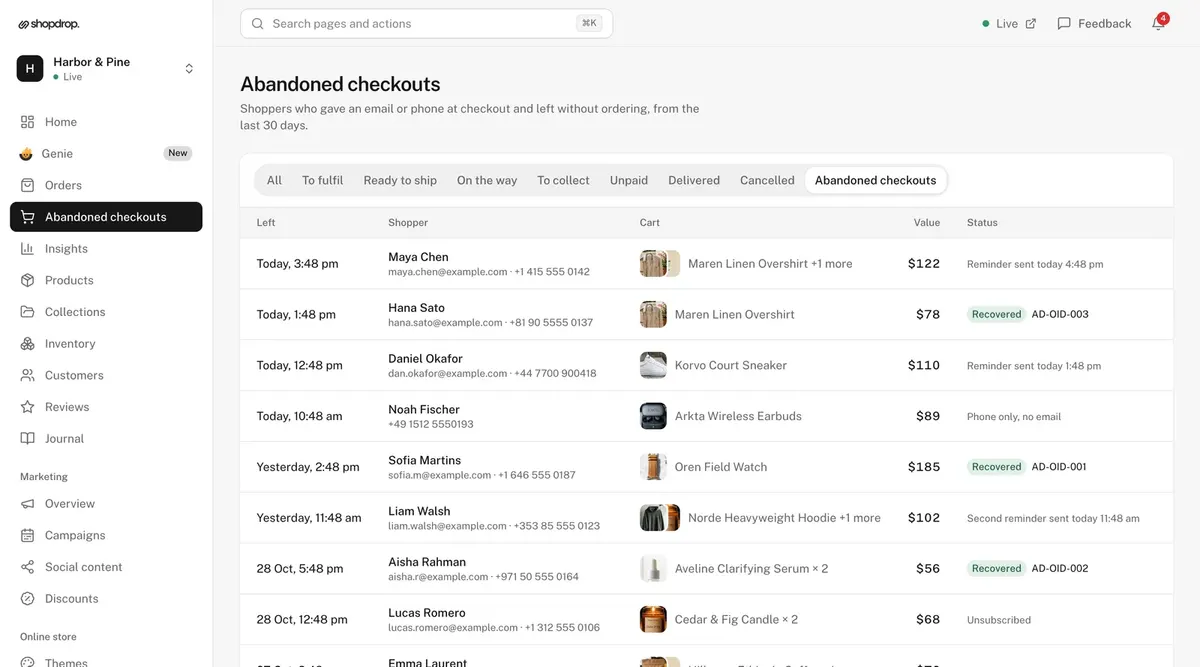
It's 9:40 on a Tuesday night. Someone on a bus has a linen overshirt and two ceramic cups in their cart, types their email at checkout, and then their stop comes. The tab closes. In the morning there's no order, but there is a checkout: a name, an email and $122 of things they wanted.
An hour after they leave, your store can send them a reminder. Whether they open it comes down to about 40 characters in an inbox full of other mail. Here are 30 abandoned cart email subject lines for that moment, grouped by the email they belong in, and three complete reminders you can copy.
In short
Put the point in the first 40 characters. Most inboxes cut a subject at around 60 characters on a computer, and phones show fewer.
Name what they left. "You left the linen overshirt in your cart" gets read. "You forgot something" looks like every other promo.
Write it the way the shop owner would say it to a regular.
Keep the discount for the second or third email. A code in the first one teaches shoppers to leave carts and wait.
Give each email its own job: remind, then answer a doubt or make an offer, then show what else you sell.
On this page
- How to read the lines below
- 10 subject lines for the first email
- 10 subject lines for the second email
- 10 subject lines for the last email
- Preview text that finishes the thought
- Three complete reminders you can copy
- What to leave out
- How to tell which subject line works
- Writing them in Shopdrop
- Common questions
- The bus home
| When it goes | Its job | A subject that does it | |
|---|---|---|---|
| First | An hour after they leave | Remind them, with the cart | You left {{item}} in your cart |
| Second | A day later | Answer a doubt, or offer a code | {{offer}} your cart at {{store_name}} |
| Third | Three days later | One last look, plus a few more products | Still thinking about {{item}}? |
How to read the lines below
The words in double braces are merge tags. Your store fills them in for each shopper. In Shopdrop, you type them straight into the reminder editor:
{{first_name}}: the shopper's first name, from checkout
{{item}}: the product's name when the cart holds one product, or "3 items" when it holds more
{{store_name}}: your store's name
{{offer}} and {{code}}: the discount you attached, like "15% off" or "$10 off", and its code
Product names can run long. If yours do, use the lines without {{item}}, so the subject still fits in 60 characters.
10 subject lines for the first email
The first reminder goes while the shopper still remembers the cart. It needs no persuasion, just the cart and a way back.
You left {{item}} in your cart
{{first_name}}, your {{item}} is in your cart
Your cart at {{store_name}} is ready when you are
Pick up where you left off, {{first_name}}
Your Ethiopia beans are still in your cart
The court sneakers you picked are in your cart
Did checkout get cut short?
Your cart is one tap from done
Back to your cart at {{store_name}}
Still want the {{item}}?
Lines 5 and 6 skip {{item}} and name the product in your own words, which suits a store with a few bestsellers and short, clear names.
10 subject lines for the second email
A day later, the shopper who meant to come back has usually done it. The ones left often had a question: what delivery costs, how long it takes, whether it's worth it. Answer that, or offer a code.
Your {{item}} is still in your cart
Free delivery on your cart at {{store_name}}
Cash on delivery is on for your order
{{offer}} your cart at {{store_name}}
Your code {{code}} is waiting at checkout
Questions about {{item}}? Just reply
Here's {{offer}} the {{item}} you picked
What people say about {{item}}
Your cart arrives in 2 to 4 days if you order today
{{first_name}}, a small thank-you: {{offer}}
Send lines 2, 3 and 9 only when they're true for that cart. A shopper who reads "free delivery" and then finds a fee at checkout has little reason to trust the next email.
10 subject lines for the last email
The third email is the last word. It repeats the cart and adds a few more of your products, so even a shopper who has gone off the first item has something new to look at.
Still thinking about {{item}}?
Your code for {{store_name}} is still good
One last look at your cart
A few more things you might like, {{first_name}}
Your cart, plus three picks from {{store_name}}
New arrivals to go with your {{item}}
Your cart is still here, and so is {{offer}}
Last reminder about your cart
Your {{item}}, and what goes with it
This is the last email about your cart
Line 10 sounds blunt, and it works because shoppers trust a store that says plainly when the emails will stop.
Preview text that finishes the thought
The preview text is the gray line after the subject in most inboxes. Use it for the second thing the shopper should know, like how fast the order ships or that the code is already on the cart, and never to repeat the subject.
| Subject | Preview text |
|---|---|
| You left {{item}} in your cart | Your cart and details are saved, so checkout takes a minute. |
| Free delivery on your cart at {{store_name}} | Orders over $80 ship free, and yours already qualifies. |
| {{offer}} your cart at {{store_name}} | Use {{code}} at checkout. It's already added if you tap through. |
| Questions about {{item}}? Just reply | Sizing, delivery or care: reply and we'll answer today. |
| One last look at your cart | Plus three new arrivals we think you'll like. |
Three complete reminders you can copy
Each has all five parts of an email. Swap in your own store, products and tone, and keep the shape.
A candle shop, first email
Subject: You left Cedar & Fig in your cart
Preview text: Hand-poured last week, ready to ship tomorrow.
Heading: Your cart is still here, {{first_name}}
Message: You were checking out a few minutes ago and stopped. Your Cedar & Fig candle is still in your cart, and the button takes you straight back with your details filled in.
Button: Finish my order
A sneaker store, second email with a code
Subject: 15% off your cart at Northfield Sneakers
Preview text: Use WELCOME15 at checkout. Ends Sunday.
Heading: Your court sneakers, 15% off
Message: You picked the Court Sneaker in white yesterday. Here's 15% off to make the decision easier. The code is already on your cart when you tap the button, and it runs until Sunday night.
Button: Use my code
A skincare brand, third email
Subject: Still thinking about the clarifying serum?
Preview text: Your cart, plus the two products people pair it with.
Heading: One last look, {{first_name}}
Message: Your clarifying serum is still in your cart. Below it are the cleanser and moisturizer most people use with it, in case you'd like the full routine. This is our last email about this cart.
Button: See my cart
What to leave out
Deadlines that aren't real. "Your cart expires tonight" is only fine if it does. Shoppers notice when the same cart is still there next week.
"Re:" or "Fwd:" in front of the subject. It pretends to be a conversation, and the shopper feels tricked the moment they open it.
All capitals and stacks of exclamation marks. They read like a promo blast.
More than one emoji. One can help a line stand out in a busy inbox. Three look like an ad.
A code in the first email. The shoppers who were coming back anyway get it, and regulars learn to wait.
A subject the email doesn't keep. If the line says free delivery, the cart must qualify.
How to tell which subject line works
Change one thing at a time. If you change the subject, the timing and the code in the same week, you won't know which one moved the number.
Write down the day you made the change. Then compare recovered orders and the recovery rate for the same length of time before and after. A small store may need a month or more to see a difference, because a handful of checkouts can swing the rate either way.
Writing them in Shopdrop
In Shopdrop, reminder emails live under Orders, then Abandoned checkouts. From the Starter plan, your store sends the first one an hour after the shopper leaves. Growth and Pro add the second a day later and an optional third at three days, with a few more of your products. On those plans each email has its own fields for the subject, preview text, heading, message and button, and the merge tags in this guide work as written. Leave a field empty and Shopdrop's own words fill it.
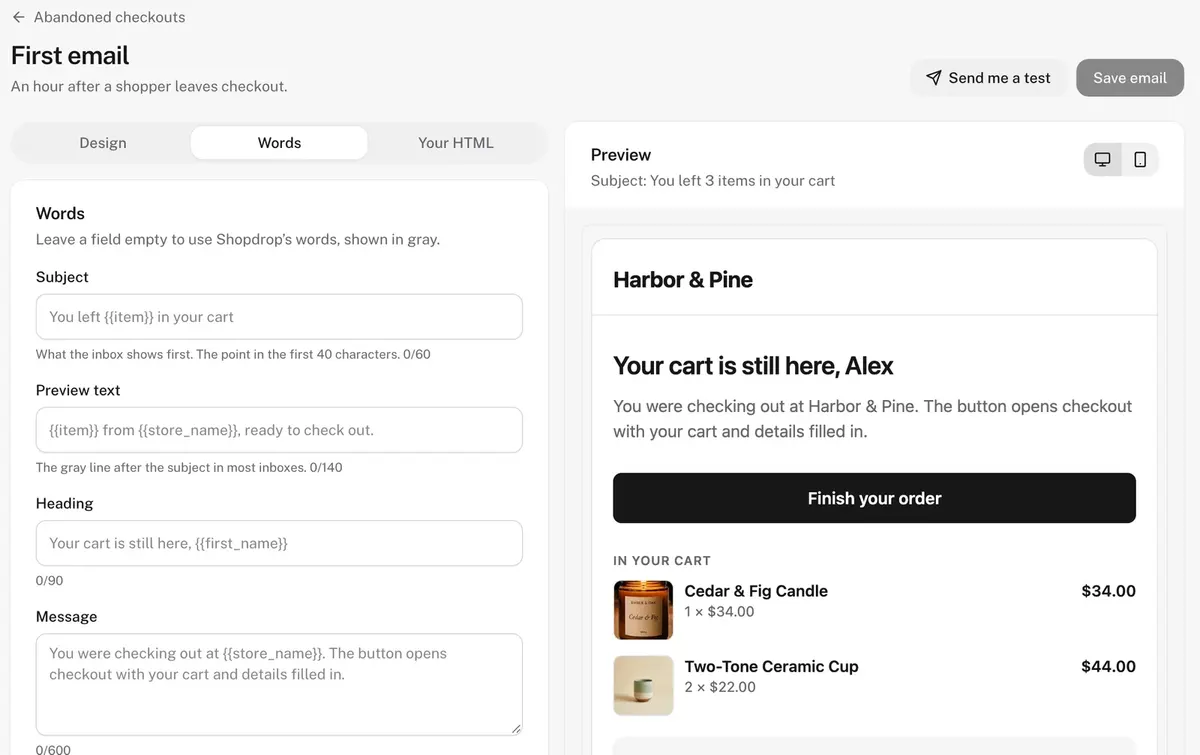
The preview on the right uses your newest products and a sample shopper, so you see the email as it will arrive. Send yourself a test before you switch the reminders on. If you'd rather not write them yourself, tell Genie, the AI built into your dashboard, what you want, for example "warmer, and mention free delivery over $80". It writes all five fields for 1 credit, and you edit from there.
To see whether a new subject line helps, open Insights and choose the Checkouts view. It shows abandoned checkouts, recovered orders, recovered sales and your recovery rate over 7, 30 or 90 days. Every plan also lists each abandoned checkout with its cart and value, and from Starter you can message the shopper on WhatsApp from your own phone, with a link that brings their cart back.
Common questions
How long should an abandoned cart email subject line be?
Under 60 characters, with the point in the first 40. Most inboxes cut subjects at around 60 characters on a computer and show fewer on a phone.
Should the first abandoned cart email include a discount?
No. Keep it for the second or third email. A code in the first one goes to shoppers who were coming back anyway and teaches regulars to wait for it.
How many abandoned cart emails should I send?
Two or three: an hour after the shopper leaves, a day later, and an optional last one around three days. The guides we read stop at three, and so do Shopdrop's reminders.
Do emojis help abandoned cart subject lines?
One can make a line stand out. More than one makes it look like an ad. Test it against the same line without one.
The bus home
The shopper from 9:40 on Tuesday didn't change their mind. Their stop came. An hour later, a short email with the overshirt's name in the subject and a button back to the cart is often all it takes. That's the reminder we built Shopdrop to send for you, in your store's name and your words.
Build your online store from $0 a month, with no commission.
Start your store freeFirst published Oct 31, 2026.